
Posted by: Matt Lewis
Published:
Updated:

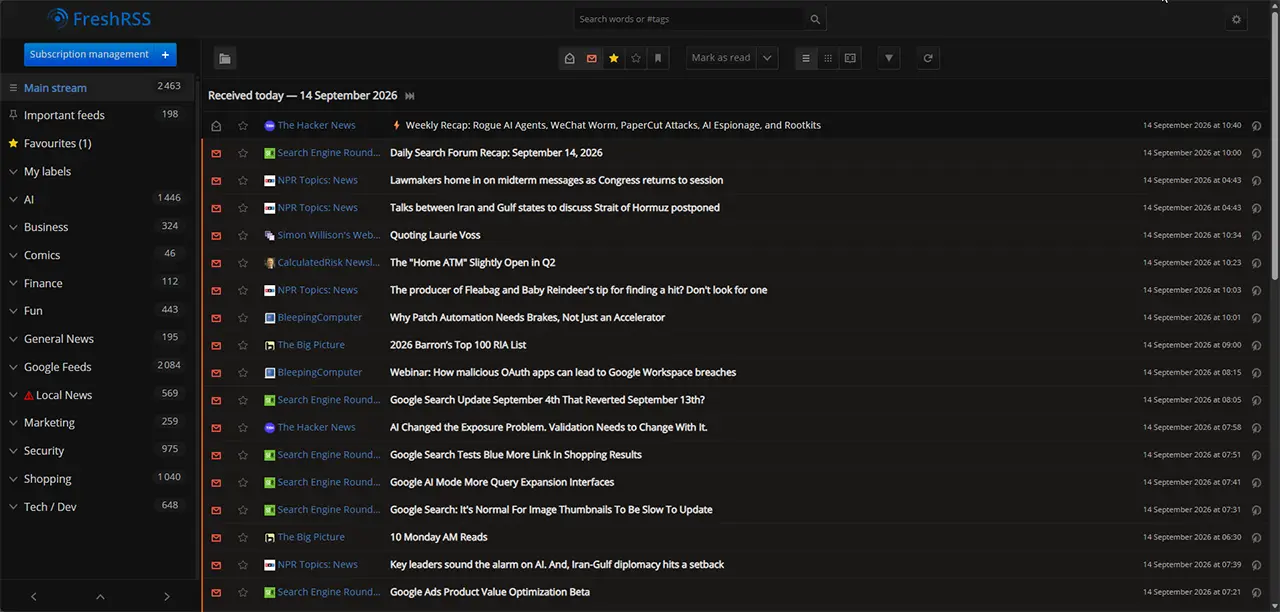
A self-hosted feed reader with search, filtering, scraping, and mobile sync.
I follow plenty of blogs and software projects, but I don’t want to check every site by hand or trust a social feed to show me what I missed. FreshRSS gathers those updates in one place, gives me useful filters, and runs on shared hosting.
FreshRSS is a self-hosted feed aggregator written in PHP. You install it on your own hosting account, point it at the sites you follow, and it collects everything into one place that you control.
On the surface, it is a straightforward feed reader. Underneath that interface, FreshRSS can fetch, filter, deduplicate, search, and archive content using a surprisingly capable query language.
It can build feeds for websites that never published one, pull full article text out of truncated feeds, hide predictable noise before you ever see it, and even republish a saved search as a new RSS feed for another tool to consume.
You can use it as a simple reading list. The filters become useful once that list grows and you find yourself skipping the same kinds of posts every day.
FreshRSS needs neither Docker nor a VPS.
Shared hosting support is one of the biggest practical reasons to pick FreshRSS over its competitors.
Many self-hosted readers assume you can “just run the container.” That is fine if you have a VPS. It is less useful if what you have is a cPanel account. Miniflux wants PostgreSQL and a Go binary. Tiny Tiny RSS recommends Docker and says support may be limited without it. CommaFeed is Java.
FreshRSS is PHP and MySQL. No container, no build step, no reverse proxy to configure, and no daemon to keep alive. It installs from Softaculous in about a minute. On Hawk Host, Softaculous also creates the feed refresh cron job; you just need to check its schedule after installation.
The project’s own requirements page says FreshRSS “should run on most shared host servers.” The work grows with your subscriptions, refresh schedule, and retention settings.
And who will be happier with a hosted reader.
FreshRSS makes the most sense if you are one of these people.
You follow A LOT of sources. If you only need updates from a few sources you’re probably better served using a hosted reader.
You want the reading app and the reading data to be separate things. FreshRSS uses the Google Reader API, so it stores and syncs state while some other app handles the actual reading. Switch phones, switch apps, keep your history.
You’re doing research, monitoring, or competitive intelligence. Security advisories, regulatory notices, competitor blogs, job boards, a supplier’s changelog page. FreshRSS can favorite, label, and archive matches automatically, and it will hang onto them long after the source site rotates them off the front page.
You are already paying for hosting. There is a real argument that if you have a cPanel account sitting there anyway, adding a feed reader to it costs you nothing but ten minutes.
You want to keep a local archive of what you read. Ever gone back to reread something only to find that the article was edited, moved, or disappeared entirely? FreshRSS can retain article content in your own database for as long as you’d like to keep it.
Who should skip it? If you only follow a few sources and have no interest in tuning filters, managing retention, or fiddling with the occasional setting, a free hosted reader or app is probably the better choice.
Beyond the usual categories, unread counts, themes, and keyboard shortcuts.
FreshRSS covers the basics well: categories, unread counts, favorites, keyboard shortcuts, a mobile layout, light and dark themes, and more than twenty interface languages.
Here is what sets it apart.
You get field operators (intitle:, intext:, author:, inurl:, #tag, label:), boolean OR, negation, parentheses for grouping, ISO 8601 date intervals, and regular expressions on the text fields. Saved searches can even be referenced inside other searches, which means you can compose them.
Those search tools power saved queries, automatic filtering, labels, and several of the workflows covered later in this series.
Any expression you can type into the search box can be attached to a feed as a filter action. FreshRSS supports three actions: mark as read, mark as favorite, and apply a label. You can automatically mark sponsored posts as read while starring CVE advisories for review.
FreshRSS has a built-in HTML + XPath scraper. You give it an XPath expression for “where the items are on this page,” another for the title, another for the link, and it synthesizes a feed out of an ordinary web page. There is a JSON equivalent too, including one for pulling JSON back out of an HTML document.
A saved query can be shared at its own HTML, RSS, or OPML URL. Another application can then subscribe to the filtered result instead of processing all fifty source feeds itself.
Polling is rate-limited on purpose, so that nobody accidentally builds a DDoS out of a feed reader. But for publishers that support WebSub, the publisher pushes to you instead, and new articles land more or less instantly. This requires your instance to be publicly reachable, which on shared hosting it already is.
Plan for your feed count, refresh schedule, and article storage.
Check the refresh schedule and file access after installation.
/opt/alt/php81/usr/bin/php /home/USERNAME/rss/app/actualize_script.php > /home/USERNAME/rss/data/users/FreshRSS_cron.log 2>&1Resist the urge to import three hundred feeds on day one.
Delete the sample feeds. FreshRSS seeds a few defaults. They exist to prove the install works. They have done their job.
Add five feeds you will read. Not fifty. Five. You are calibrating your own tolerance, and it is much easier to add feeds than to prune them.
Check the refresh schedule. Confirm the job exists in cPanel. You can refresh feeds manually now; come back after the job’s next scheduled run to make sure automatic updates are working. If they are not, check the command, install path, and PHP binary.
Turn on the API. Under Authentication, enable API access. Then under Profile, set an API password, which is separate from your login password. Click the API address link on that page and run the built-in server check. If it says PASS, mobile clients should be able to connect. Fix any error while you still have the full admin interface in front of you.
Set a purge policy. Go to Configuration → Archiving and check the defaults on your installation. Something like “keep three months” is a reasonable starting point, and you can override it per feed later.
Then leave it alone for a week. Come back and look at what you actually read versus what you scrolled straight past. That second list is what the filtering in part one of the tips series is for.
Yes!
It is open source under the GNU AGPL v3, with no paid tier.
Yes, and this is one of the better things about it. FreshRSS implements the Google Reader API, which is supported by practically every major RSS app.
The mobile web interface is also perfectly usable if you would rather not install anything at all.
You export it. FreshRSS exports your feed list as standard OPML that any other reader will import, and it can also export your favorites and labeled articles as actual content rather than just links.
There is a command-line export that produces a ZIP or a SQLite file containing everything, which is the option you want if you have been using FreshRSS as a research archive.
Yes. Each user can have separate feeds, categories, filters, and API passwords. There is also an anonymous reading mode if you want a public instance.
Practically speaking, an administrator has to create the accounts, so it fits a family or a small team better than a public sign-up service.
They overlap heavily, and TT-RSS has been around longer. On shared hosting, deployment is the deciding factor: Tiny Tiny RSS recommends Docker and says support may be limited without it. FreshRSS is a PHP application that installs from Softaculous.
FreshRSS also has XPath scraping built into core, which TT-RSS leaves to plugins.
Usually not for a modest reading list. The refresh job runs on a schedule, does its work, and exits. A few hundred feeds or aggressive refresh settings mean more network and database work, so keep an eye on your account’s resource usage.
The exception is full-text extraction, which fetches every article’s original page individually. Enable it on the handful of feeds that need it, not everywhere.
FreshRSS is a great pick for shared hosting. If your setup is different, one of these may suit it better.
Start with a few feeds and see what you actually read. When you notice yourself skipping the same sort of post every day, the next guide shows you how to let FreshRSS clear those for you.













 Shared Web HostingSimple, secure, and reliable cloud hosting
 Semi-Dedicated Cloud HostingHigher power & more resources
 Reseller Cloud Web HostingWhite label & fully customizable
 Contact Support