
Changing IPS Tag on a domain name registered with Hawk Host
Transferring a .UK domain away from Hawk Host requires changing the domain’s IPS Tag. Your new registrar will provide you with their IPS Tag.
For transferring a .UK domain to Hawk Host, see IPS Tag for transferring .UK domain names to Hawk Host.
Navigate to domain management
Section titled “Navigate to domain management”-
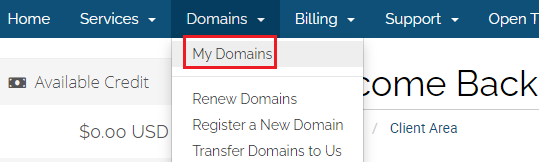
Log in to your client area and navigate to Domains > My Domains:
-
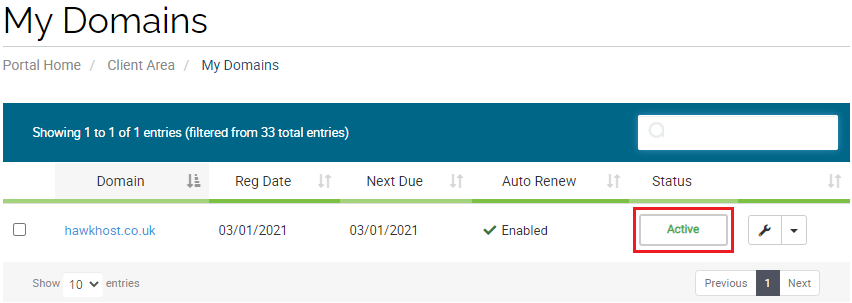
Click the green Active button next to the domain you’re transferring:
Release the domain
Section titled “Release the domain”-
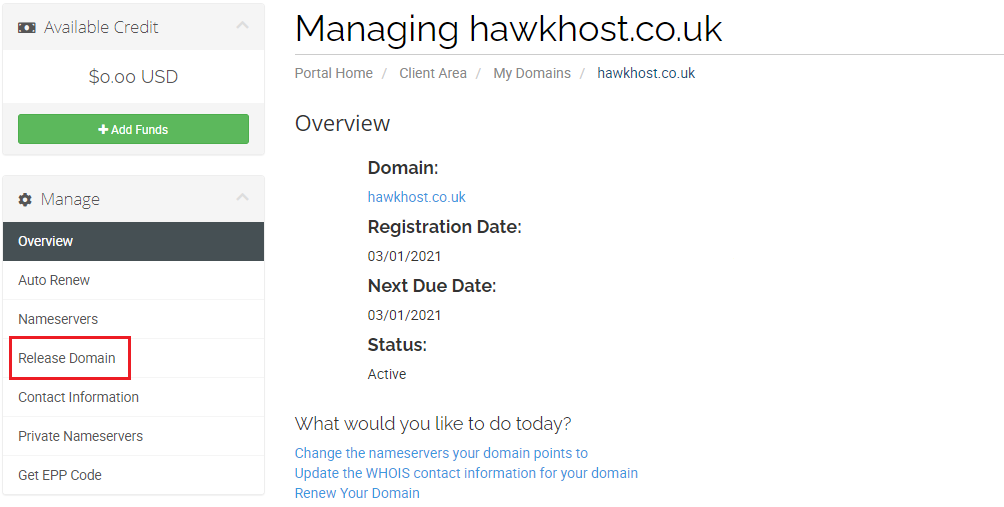
From the domain management page, click Release Domain in the Manage menu on the left:
-
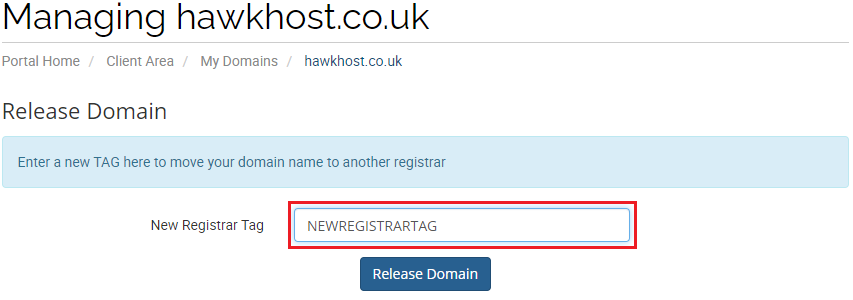
Enter your new registrar’s IPS Tag in the New Registrar Tag field and click Release Domain:
-
The domain should be released to your new registrar within 24 hours. Contact your new registrar for further details on the transfer status.