
Where can I login to my cPanel control panel?
All shared, reseller, and semi-dedicated hosting plans include cPanel access. Your cPanel username and password are included in the New Account Information email sent when your hosting service is first activated.
Login methods
Section titled “Login methods”Option 1: Via your domain (DNS must be pointed to Hawk Host)
Section titled “Option 1: Via your domain (DNS must be pointed to Hawk Host)”If your domain’s nameservers or DNS are already pointed to our hosting, you can access cPanel at any of these URLs (replace yourdomain.com with your actual domain):
https://yourdomain.com:2083https://yourdomain.com/cpanelhttps://cpanel.yourdomain.com
Option 2: Via server hostname
Section titled “Option 2: Via server hostname”If your domain is not yet using our nameservers, use the server hostname URL provided in your New Account Information email.
Option 3: Via the client area
Section titled “Option 3: Via the client area”- Log in to the client area and go to My Services
- Click the green Active button next to your hosting service:

- From the Product Details page, scroll down to the One Click Login menu, and click cPanel from either of the presented icons:
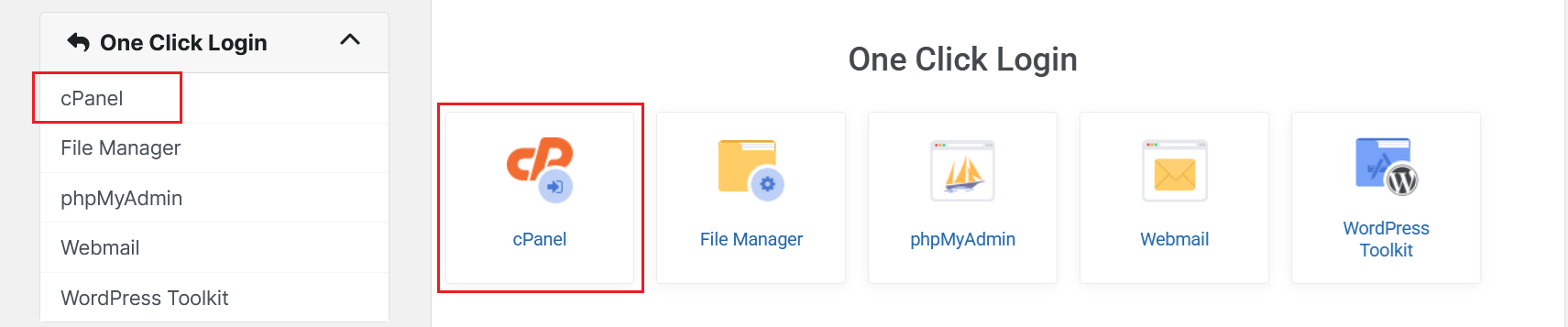
- You will be redirected to cPanel without having to enter your cPanel username or password.
Resetting your cPanel password
Section titled “Resetting your cPanel password”If you’ve forgotten your cPanel password, you can reset it through the client area. You can follow our guide How can I reset my cPanel password?.