
How do I allow remote MySQL connections?
Overview
Section titled “Overview”By default, MySQL connections are only permitted from the local server. To allow external hosts to connect to your MySQL databases, two steps are required:
- Firewall whitelist — Our support team must whitelist the connecting IP address(es) through the server firewall.
- cPanel Remote MySQL — You must also authorize the remote host through the Remote MySQL interface in cPanel.
Step 1: Request a Firewall Whitelist
Section titled “Step 1: Request a Firewall Whitelist”Open a support ticket through the client area or email support@hawkhost.com. In your ticket, provide the IP address(es) or hostnames that need remote MySQL access.
Step 2: Add the Host in cPanel
Section titled “Step 2: Add the Host in cPanel”-
Log in to cPanel for your account.
-
Type Remote MySQL into the search bar and click the Remote MySQL interface icon.

-
In the Add Access Host section, enter the IP address or hostname you need to allow and click Add Host.
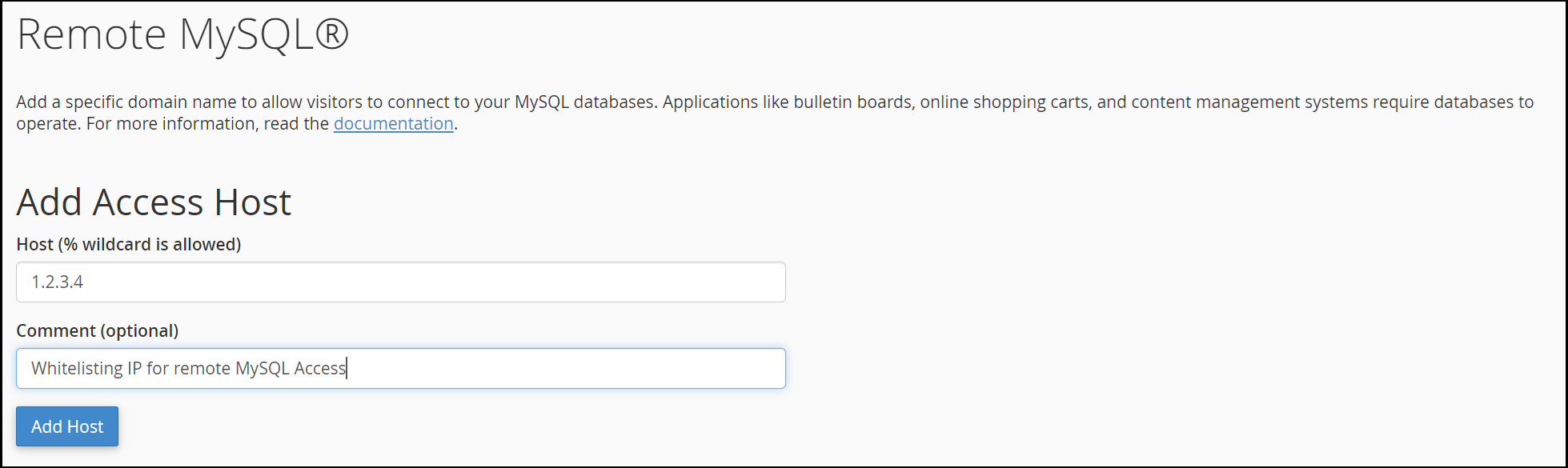
-
Once added, the IP will appear in the Manage Access Hosts section confirming the remote host has been authorized.
