
Weebly Showing an Error Publishing Site
Weebly was a free drag-and-drop site builder offered with shared, cloud web hosting, and semi-dedicated hosting plans. If you had added Weebly and were unable to publish, you may have seen the following error:
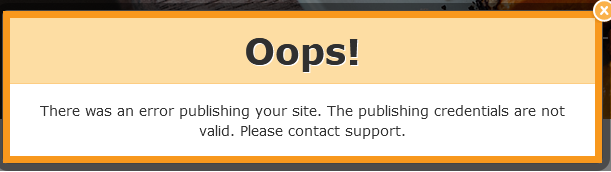
Common Causes
Section titled “Common Causes”No Active Web Hosting Plan
Section titled “No Active Web Hosting Plan”While the Weebly site builder was free, it required an active shared or semi-dedicated hosting service with Hawk Host. Without an active hosting plan, there is no server to host the Weebly site.
Domain Name Not Registered
Section titled “Domain Name Not Registered”In addition to requiring an active hosting plan, the domain name you are trying to use must be registered. Purchasing a hosting plan and adding Weebly does not include a domain registration. You can register your domain name through the Hawk Host website.
DNS/Nameservers Not Pointed Correctly
Section titled “DNS/Nameservers Not Pointed Correctly”If your domain name is registered and you have a hosting plan, but publishing is not working, check to make sure your nameservers or DNS for the domain are pointed to your account. You can find your account’s nameservers in your “New Account Information” email or through your client area under “My Services”. If you are using third-party nameservers, you can find your site’s shared IP address for your DNS A record through cPanel in the Server Information interface.
Invalid FTP Publishing Credentials
Section titled “Invalid FTP Publishing Credentials”This can happen if the FTP user is missing or if your password is not correct. You can confirm if an FTP user was properly created by logging in to cPanel and visiting the FTP Accounts interface. You should see a user with a name similar to the following:

If the issue is related to FTP credentials, please contact support at support@hawkhost.com or open a ticket for assistance.