
How to fix WordPress update error: Download failed. cURL error 60: SSL certificate
Issue description
Section titled “Issue description”When attempting to update WordPress from the admin panel, you may encounter the following error:
Download failed.: cURL error 60: SSL certificate problem: unable to get local issuer certificate.
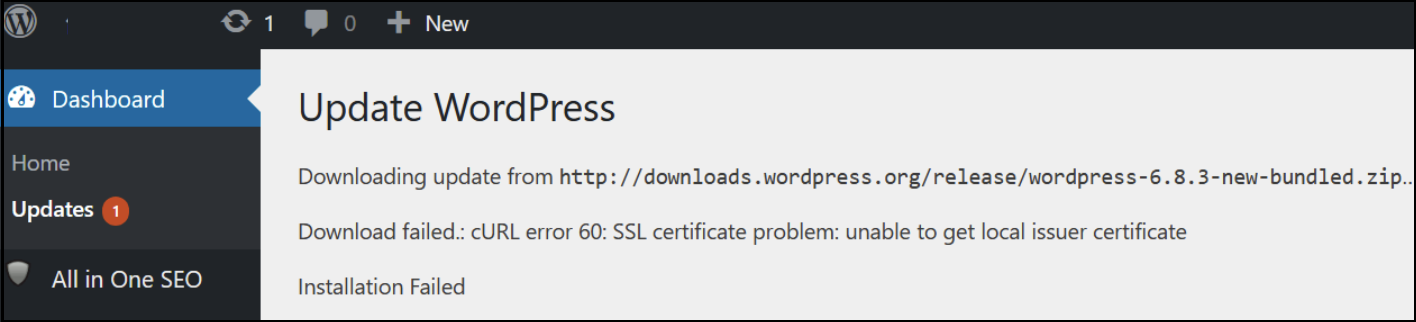
This error prevents WordPress from downloading update packages securely over SSL.
The error occurs because WordPress cannot verify the SSL certificate of the update server. This is typically caused by an outdated or missing certificate authority (CA) bundle file (ca-bundle.crt) in your WordPress installation. The CA bundle contains trusted root certificates used to validate SSL connections — if it’s outdated, cURL’s SSL verification fails.
Resolution
Section titled “Resolution”-
Download the latest CA bundle from the official WordPress GitHub repository: https://github.com/WordPress/WordPress/blob/master/wp-includes/certificates/ca-bundle.crt
-
Upload the file to your WordPress installation at:
/wp-includes/certificates/ca-bundle.crtIf an older
ca-bundle.crtfile exists, overwrite it with the new file. -
Set correct permissions — ensure the file has
644permissions so WordPress can read it:Terminal window chmod 644 wp-includes/certificates/ca-bundle.crt -
Retry the update — return to your WordPress admin panel and click Update Now again. The update should now proceed without SSL certificate errors.