
How to only allow Cloudflare traffic
On your cPanel VPS, Cloudflare may be enabled on all accounts, and you wish to allow Cloudflare traffic only on ports 80/443. The easiest method will be using CSF to close both ports 80 and 443 then opening it only for Cloudflare.
Install Config Server Firewall (CSF)
Section titled “Install Config Server Firewall (CSF)”dnf install cpanel-csfLog in to your server’s WHM and go to “ConfigServer Security & Firewall”
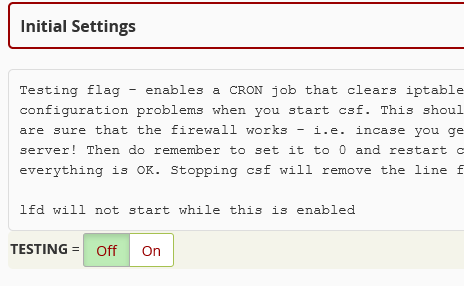
Disable Testing Mode
Section titled “Disable Testing Mode”You will need to go to Firewall Configuration and disable testing mode
Close ports 80 and 443
Section titled “Close ports 80 and 443”After this, you need to adjust your TCP and UDP to close ports 80 and 443.
TCP Incoming Configuration
Section titled “TCP Incoming Configuration”20,21,22,25,53,110,143,465,587,853,993,995,2077,2078,2079,2080,2082,2083,2086,2087,2095,2096,8443UDP Incoming Configuration
Section titled “UDP Incoming Configuration”20,21,53,853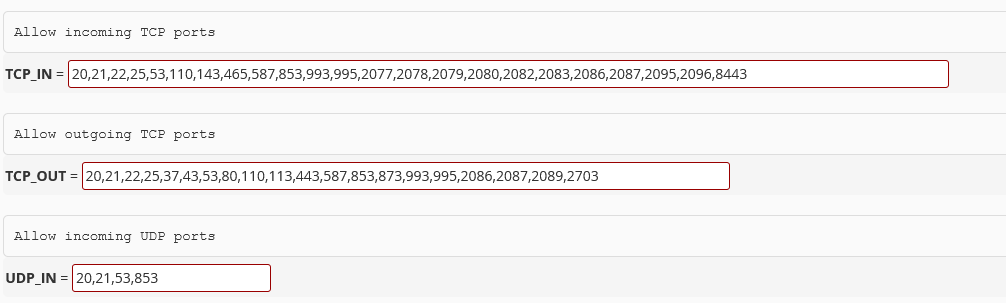
Go to the bottom and click Change, then Restart csf+lfd
Allow Cloudflare IPs
Section titled “Allow Cloudflare IPs”Now you need to allow Cloudflare IPs. Go to the IP Allow section and add the following at the bottom:

# Cloudflare IPs173.245.48.0/20103.21.244.0/22103.22.200.0/22103.31.4.0/22141.101.64.0/18108.162.192.0/18190.93.240.0/20188.114.96.0/20197.234.240.0/22198.41.128.0/17162.158.0.0/15104.16.0.0/13104.24.0.0/14172.64.0.0/13131.0.72.0/222400:cb00::/322606:4700::/322803:f800::/322405:b500::/322405:8100::/322a06:98c0::/292c0f:f248::/32Please refer to Cloudflare documentation for the latest IPs.
Go to the bottom and click Change, then Restart csf+lfd
Your server should now only allow traffic from Cloudflare on ports 80 and 443.