
PayPal subscription underpaid invoice
I’ve made a subscription payment, but my invoice is unpaid
Section titled “I’ve made a subscription payment, but my invoice is unpaid”A PayPal subscription sends a fixed amount to Hawk Host each month, which unfortunately means that if your price changes for any reason, the PayPal subscription will no longer cover the full amount. A price change could be due to an upgrade, add-on price changes, or changes to the plan itself.
Due to this change, existing PayPal subscriptions will still send the old amount, leaving an unpaid balance on your invoice.
How do I view and pay the invoice balance?
Section titled “How do I view and pay the invoice balance?”When viewing your invoice, look for the Balance line item:
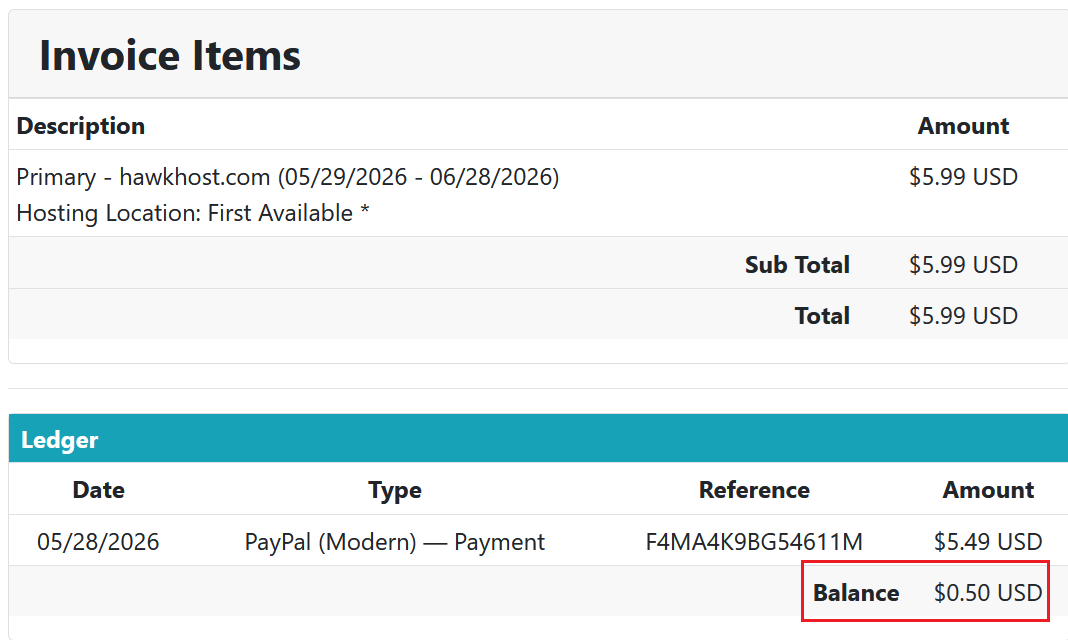
Through the same invoice, use the Pay Now button to finalize payment of the owed balance, at which point the invoice will be paid and your renewal will be complete.
How do I correct this for future payments?
Section titled “How do I correct this for future payments?”Unfortunately, legacy PayPal subscriptions cannot be modified. What you’ll need to do is log in to your PayPal account and cancel the active subscription. Cancelling a PayPal subscription will not impact the status of your hosting service.
Now that you’ve canceled the old subscription for the old recurring amount, when your next month’s invoice is generated and you complete payment, you can follow the prompts to create a new subscription for future payments.
New PayPal Subscriptions
Section titled “New PayPal Subscriptions”Hawk Host no longer uses PayPal subscriptions; it now uses PayPal Payments, which links your PayPal account to your Hawk Host client area. PayPal payments allow Hawk Host to charge the exact amount on invoices, regardless of the billing term.
Still need help?
Section titled “Still need help?”You can contact our billing department by email or ticket if you have any questions regarding your unpaid invoice.