
What is the WP Toolkit WordPress Plugin?
The WP Toolkit WordPress plugin is an accompanying WordPress plugin to provide integration with the cPanel WP Toolkit. It lets you perform many WP Toolkit functions directly from WordPress.
How to Install the WP Toolkit WordPress Plugin
Section titled “How to Install the WP Toolkit WordPress Plugin”-
Log in to your hosting account’s cPanel and use the search bar to find WordPress Management.
-
Click on WordPress Management.
-
Navigate to your WordPress installation
-
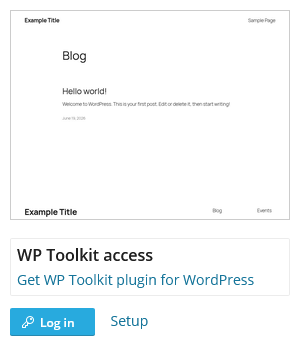
On the dashboard of your WordPress site in WP Toolkit, click Get WP Toolkit plugin for WordPress and it’ll install WP Toolkit as a must-use WordPress plugin.
How to Uninstall the WP Toolkit WordPress Plugin
Section titled “How to Uninstall the WP Toolkit WordPress Plugin”-
Log in to your hosting account’s cPanel and use the search bar to find WordPress Management.
-
Click on WordPress Management.
-
Navigate to your WordPress installation
-
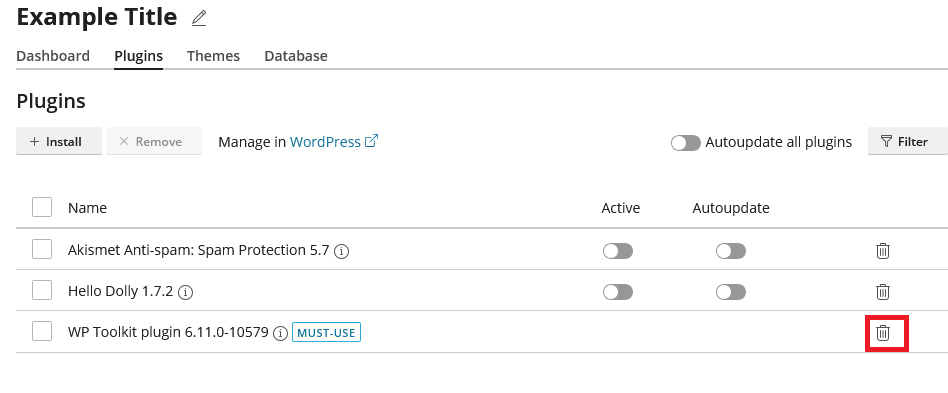
Click on the Plugins tab
-
Click the Trash icon next to the WP Toolkit plugin
WordPress Hosting Made Easy
Fast NVMe Storage • Free Migrations • 24/7 Expert Support