
How do I pay my invoice with OXXO?
OXXO is a popular alternative payment method in Mexico. Hawk Host accepts OXXO payments for all services.
How to pay with OXXO
Section titled “How to pay with OXXO”-
Open your invoice in the client area or from your new order checkout. In the payment method dropdown, select OXXO.
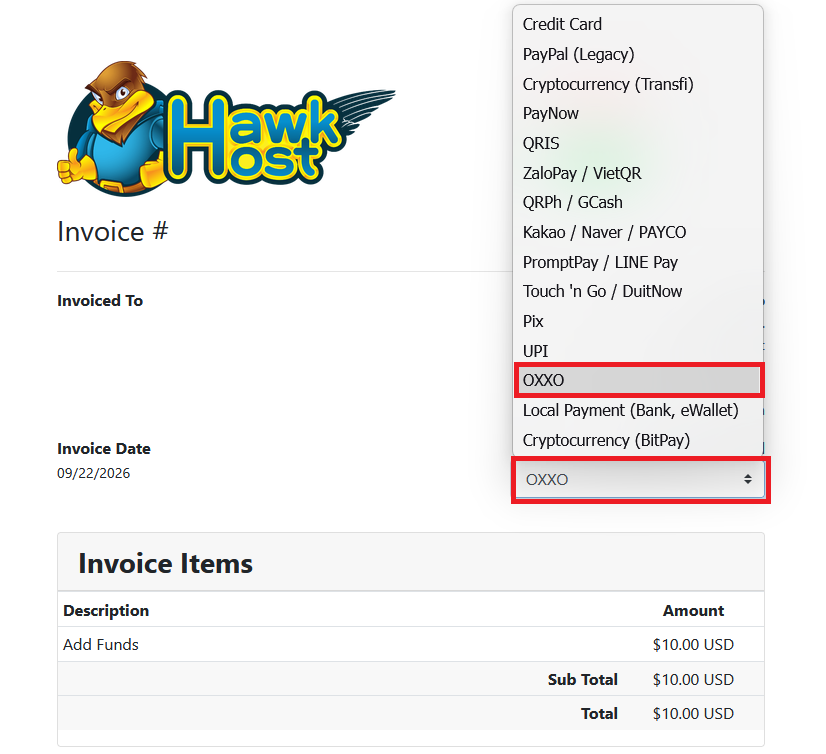
-
Click the green Pay Now button.
-
You will be redirected to our payment partner’s website and OXXO will be selected
-
You will be asked for your details after which you will click the Pay button.
-
You will be provided with a payment voucher containing a unique reference number and barcode
-
You will bring the voucher to a local OXXO store and you can pay with cash
-
It can take several days for invoices to be marked as paid when using OXXO to make payment. Once payment has been confirmed your invoice will be marked paid. You can visit your invoices page to confirm.
If you experience any issues, email billing@hawkhost.com or submit a ticket with a screenshot of the error and a description of the problem.