
How do I pay my invoice with QRPh or GCash?
QRPh and GCash are popular payment methods for users in the Philippines. Hawk Host accepts QRPh and GCash payments for all services.
How to pay with QRPh or GCash
Section titled “How to pay with QRPh or GCash”-
Open your invoice in the client area or from your new order checkout. In the payment method dropdown, select QRPh.
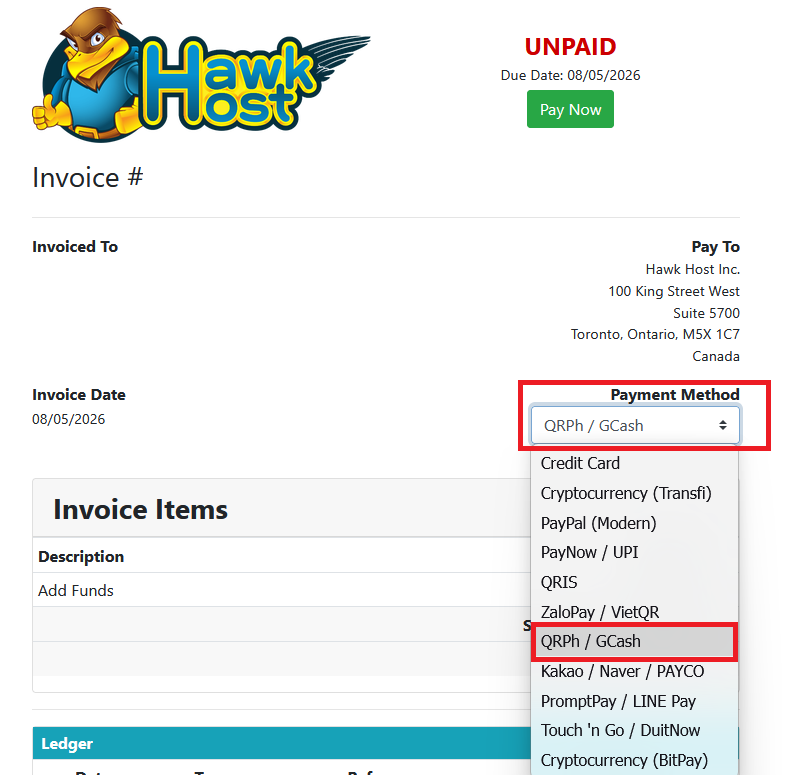
-
Click the green Pay Now button.
-
You will be redirected to our payment partner’s website, where you will select either QRPh or GCash.
-
Once you’ve selected your preferred payment method, you will be asked to click continue or scan the QR code to complete payment using your mobile device.
-
Complete the payment on your mobile device. Your browser will refresh to confirm the payment was received.
-
To verify, visit your invoices page and confirm the invoice is marked as paid.
If you experience any issues, email billing@hawkhost.com or submit a ticket with a screenshot of the error and a description of the problem.